
Pokemon Pokopia Photo Ops Guide
Pokemon Pokopia's camera system is one of its most charming features, but the Highlight Reel takes things beyond casual snapshots. These are scripted, one-time moments between your Pokemon and specific items or each other, and the game rewards you with exclusive photo frames for capturing them. Miss...
Original media: /images/guides/photo-ops-guide.webp
Use note: Fair use - Pokopia Wiki
Pokemon Pokopia's camera system is one of its most charming features, but the Highlight Reel takes things beyond casual snapshots. These are scripted, one-time moments between your Pokemon and specific items or each other, and the game rewards you with exclusive photo frames for capturing them. Miss...
Guide Overview
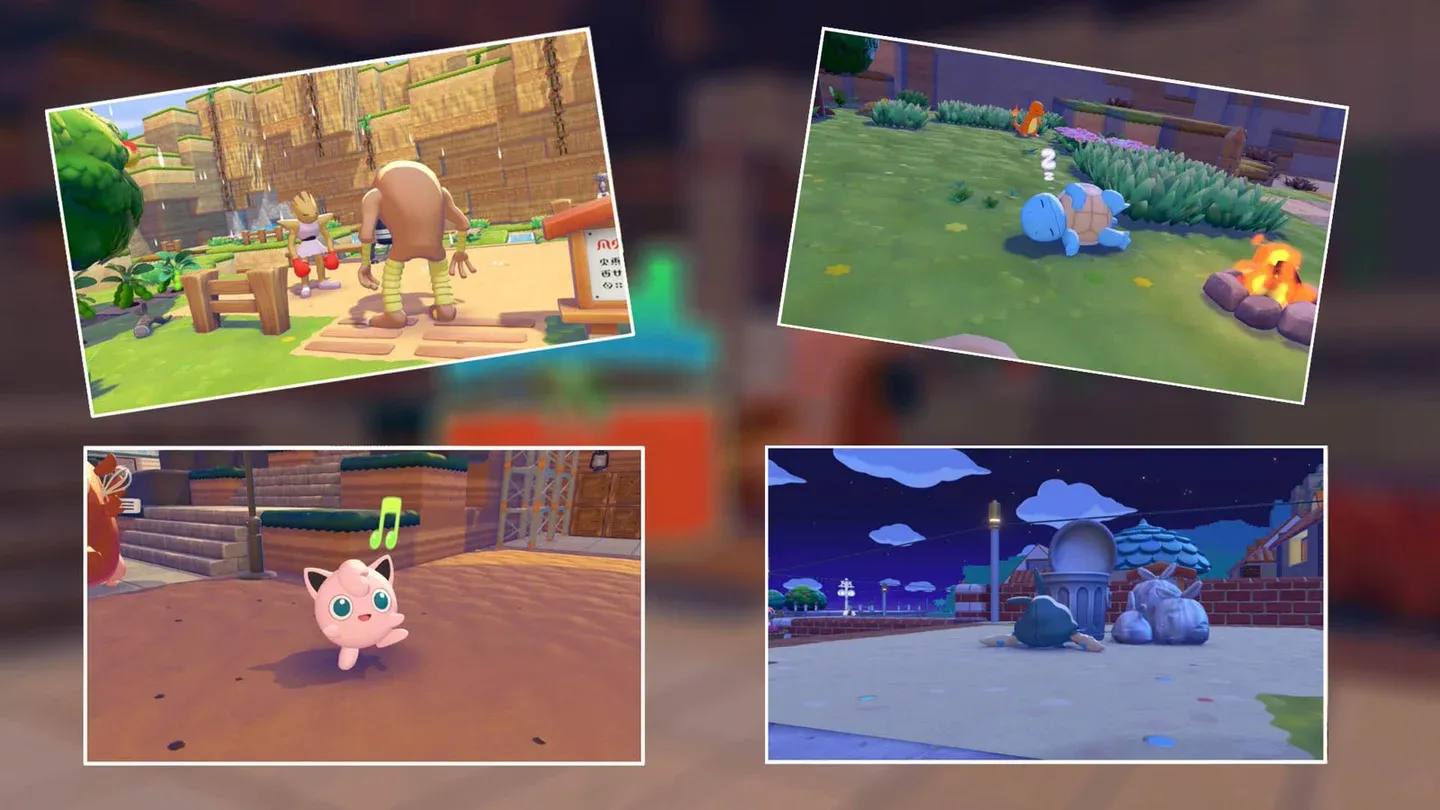
Pokemon Pokopia's camera system is one of its most charming features, but the Highlight Reel takes things beyond casual snapshots. These are scripted, one-time moments between your Pokemon and specific items or each other, and the game rewards you with exclusive photo frames for capturing them. Miss the notification, and that particular shot won't come back. Knowing exactly what to set up, and where, makes all the difference. What are Photo Ops in Pokemon Pokopia? Photo Ops are curated interactions that trigger under specific conditions as you build out your Pokopia community. When one is about to happen, a notification appears in the top right corner of your screen reading "Get your camera! A great photo op is happening nearby!" Press the - button on your left Joy-Con to pull out the camera immediately. Once the camera is open, follow the on-screen arrows toward the interaction. A border will appear around the Pokemon at the center of the moment. Take the shot using the in-game camera (not your Switch's screenshot button), and if the framing is correct, the photo op title flashes on screen and the image gets filed into your Highlight Reel under the Collections menu ( + button, then the Collection treasure chest). warning Using your Switch's built-in screenshot feature instead of the in-game camera will NOT register the photo op. Always use the in-game camera. Each Photo Op only triggers once. After you capture it, that specific scripted moment won't repeat, though you can still photograph your Pokemon freely at any time. Photo op alert notification How do you increase your chances of triggering Photo Ops? You cannot force most Photo Ops to fire on demand, but you can stack the odds in your favor. The key is placing the relevant items throughout your habitats before the notification has any chance to appear. A campfire sitting in a Pokemon's habitat is far more likely to produce the "Toasty Warm by the Campfire " moment than one you haven't placed yet. info Place multiple copies of key items like campfires, perches, and hot springs across different habitats. More exposure means more chances for the notification to fire. All Photo Ops and their requirements The table below covers every confirmed Photo Op in the Highlight Reel, what you need to trigger it, and any rewards it unlocks. Photo Op Requirement Reward Toasty Warm by the Campfire Any Pokemon relaxing near a Campfire Fire Spin Photo Frame A Gust of Wind to Get It Spinning Any Flying-type Pokemon spinning a Pinwheel with its wings None confirmed Punching Past the Sound Barrier Hitmonchan using a Punching Bag Impact Photo Frame Spacious Slumber Party Multiple Pokemon napping together (bench or large bed helps) None confirmed Greetings from Beyond the Grave A Ghost-type Pokemon interacting with a Gravestone Mysterious Frame Fun in the Sand Any Pokemon playing in a Sandbox Dust Cloud Photo Frame Found Some Delicious... Trash? Trubbish nibbling on Trash None confirmed Nothing Like a Quick Dip! Any Pokemon using a Sprinkler or Shower Bubble Photo Frame Stacking Blocks, Psychic Style A Psychic-type Pokemon playing with Wooden Toy Blocks None confirmed Battin' Around the Old Yarn Meowth playing with Knitting Supplies None confirmed A Cool, Gentle Breeze Any Pokemon interacting with a Fan None confirmed Roost and Rest A Flying-type Pokemon napping on a Perch None confirmed This Is the Life Any Pokemon soaking in a Hot Spring None confirmed Sweet Dreams with a Mossy Pillow Any Pokemon napping on Moss or near a mossy rock None confirmed Open It Up, and— Boo! Any Pokemon playing with the Boo-in-the-Box Lost Relic (L) Keep Out Photo Frame Martial Arts Training Montage Two Fighting-type Pokemon ( Hitmonchan , Hitmonlee , or Hitmontop ) sparring None confirmed The Skyland Specialists Tinkmaster and Conkeldurr interacting None confirmed No, My Horns Are Better! Heracross and Pinsir arguing near Graveler None confirmed Step Right Up, Step Right Up! A Pokemon with the Trade specialty at a Register None confirmed A Hypnotizing Lullaby Jigglypuff singing on a stage None confirmed A Cook's Gotta Eat Too! Chef Dente enjoying a meal (triggers at Rocky Ridges party if missed) None confirmed A Head Full of Blooming Flowers Mosslax's flowers blooming (only after completing Bleak Beach) None confirmed DJ Droppin' the Beats! DJ Rotom playing music for another Pokemon None confirmed Photo Ops that need specific setup Some of these won't happen organically without deliberate preparation. Here are the ones worth planning around: Open It Up, and— Boo! This one requires the Boo-in-the-Box , a Lost Relic item classified as size (L). You need to find it first, then place it somewhere your Pokemon can reach and interact with it. The payoff is worth the effort: Vespiquen getting startled by a Gengar popping out is genuinely one of the funnier moments in the game, and it unlocks the Keep Out Photo Frame . Greetings from Beyond the Grave You need a Gravestone item placed in a habitat where Ghost-type Pokemon live. Gastly is confirmed to trigger this one. If you haven't built a Ghost-type habitat yet, this won't fire naturally. Highlight Reel collection album No, My Horns Are Better! This requires both Heracross and Pinsir to be living in your Pokopia simultaneously. Both need to be in a position where they can interact with each other, and the game uses Graveler as a prop in their argument. Make sure both are housed before expecting this notification. A Head Full of Blooming Flowers This is story-locked. You cannot access this Photo Op until after completing the Bleak Beach storyline . Once that's done, Mosslax's flowers will eventually bloom and trigger the notification. How to view your completed Highlight Reel All captured Photo Ops are stored in the Highlight Reel section of your Collections menu. Press + to open the main menu, select the Collection treasure chest, then navigate to the Highlight Reel tab. Every photo taken through a Photo Op notification will have a pink camera icon in the bottom-left corner to distinguish it from regular snapshots. Your in-game photo album does have a storage limit, but any photo can be exported directly to your Nintendo Switch's system gallery from within the album. This means you can clear space without losing your Highlight Reel shots permanently. Tips for completing the full Highlight Reel faster Build diverse habitats early. The more varied your Pokemon housing, the more interactions you'll see. Campfires, perches, hot springs, and sprinklers should go in early. Don't ignore Lost Relics. The Boo-in-the-Box is a Lost Relic (L), meaning it's found out in the world rather than crafted. Keep an eye out for it during exploration. House rival Pokemon together. Heracross and Pinsir , Hitmonchan and Hitmonlee , Tinkmaster and Conkeldurr : these pairs need to coexist in your community to trigger their respective moments. Complete story beats. Bleak Beach and Rocky Ridges both gate specific Photo Ops. Progressing the main story unlocks them. Check your Highlight Reel regularly. Seeing what's already captured helps you identify gaps and figure out which items or Pokemon you're still missing. For a deeper look at building the right habitats to support these interactions, the Photo Ops guide on IGN) covers confirmed examples for several of the trickier shots. You can also find more Pokemon Pokopia tips and other gaming guides at GAMESgg .
Step-by-Step Route
Recommended Setup
Common Mistakes
FAQ
What is Pokemon Pokopia Photo Ops Guide in Pokopia?
This guide covers essential information about Pokemon Pokopia Photo Ops Guide for Pokopia players.
How do I get started with this guide?
Follow the steps outlined in this guide to achieve the best results in Pokopia.
What are the key tips for success?
Consult the detailed steps and recommended setups in this guide for optimal outcomes.